📝 Layout & Marquee
Let's start once again with our base markup & styles!
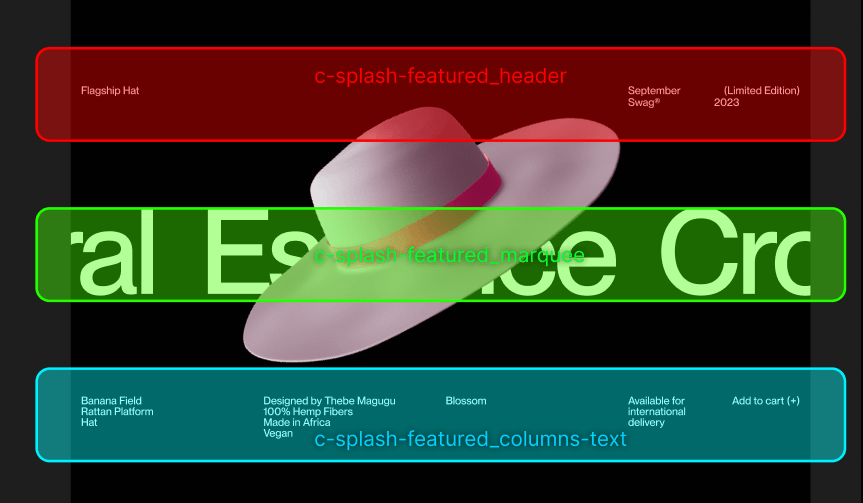
We decided to split this new .c-splash-featured component in 4 sections:
- The header
.c-splash-featured_header - The marquee
c-splash-featured_marquee - A group of text columns
c-splash-featured_columns-text - The canvas containing the WebGL scene above it all
c-splash-featured_canvas
Time to create the basics now:
<section class="c-splash-featured" data-scroll data-scroll-repeat>
    <div class="c-splash-featured_header">
        {# Always be careful to respect the document hierarchy #}
        <h2 class="c-heading || c-splash-featured_title">{{ splash_featured.title }}</h2>

        <div class="c-splash-featured_description">
            {% for item in splash_featured.description %}
                <div class="c-splash-featured_description_item">
                    <span>
                        {{ item.content }}
                    </span>
                </div>
            {% endfor %}
        </div>
    </div>

    <div class="c-splash-featured_marquee">
        {# Marquee will go here! #}
    </div>

    {# Canvas will go here #}

    {# Reuse our columns-text snippet! #}
    {% include "@snippets/columns-text.twig" with {
        classes: 'c-splash-featured_columns-text',
        columns: splash_featured.columns
    } only %}
</section>
Simply declaring this attribute will enable the repeat behavior for in-view detection of the element. This will add and remove the class in-view from the element.
And the styles that go with it:
.c-splash-featured {
    position: relative;
    @include -margin-large-bottom;
}

.c-splash-featured_header {
    display: grid;
    gap: var(--grid-gutter);
    @include -container;
    @include -margin-large-bottom;

    @media (min-width: $from-medium) {
        grid-template-columns: repeat(2, 1fr);
    }

    @media (max-width: $to-medium) {
        grid-template-columns: repeat(1, 1fr);
    }
}

.c-splash-featured_description {
    display: grid;
    grid-template-columns: repeat(2, 1fr);
    gap: var(--grid-gutter);
}

.c-splash-featured_description_item {
    &:last-child {
        text-align: right;
    }
}

.c-splash-featured_columns-text {
    @include -margin-large-top;
    @include -container;
}
Marquee effect
This is an intereseting - yet easy to reproduce - effect we're not shy with at Locomotive! To mimic the infinite effect, we just need to make sure our content is larger than the viewport width, and we create a copy of it, it's kind of a relay race!
As they say, a picture is worth a thousand words so here's a video!
Now that we have a plan, let's build it!
{# ... #}
<div class="c-splash-featured_marquee">
    <div class="c-splash-featured_marquee_inner">
        <div class="c-splash-featured_marquee_list">
            {% for item in splash_featured.marquee %}
                <div class="c-splash-featured_marquee_item">
                    <span>
                        {{ item.content }}
                    </span>
                </div>
            {% endfor %}

            {% for item in splash_featured.marquee %}
                <div class="c-splash-featured_marquee_item">
                    <span>
                        {{ item.content }}
                    </span>
                </div>
            {% endfor %}
        </div>
    </div>
</div>
{# ... #}
// ...
.c-splash-featured_marquee {
    overflow: hidden;
}

.c-splash-featured_marquee_list {
    display: inline-flex;
    white-space: nowrap;
    animation: marquee 15s linear infinite;
    animation-play-state: paused;

    // To improve performance, let's only animate our marquee when it's in-view.
    .c-splash-featured.is-inview & {
        animation-play-state: running;
    }
}

.c-splash-featured_marquee_item {
    font-size: 17vw;
    margin-right: 7vw;
}
// ...
The marquee keyframe is defined in assets/styles/utilities/_animations.scss
Add the canvas
WebGL content is displayed using the canvas element, let's add one and position it above our whole section!
<section class="c-splash-featured" data-scroll data-scroll-repeat>
    <div class="c-splash-featured_header">{# ... #}</div>
    <div class="c-splash-featured_marquee">{# ... #}</div>

    <canvas class="c-splash-featured_canvas"></canvas>

    {% include "@snippets/columns-text.twig" with {
        classes: 'c-splash-featured_columns-text',
        columns: splash_featured.columns
    } only %}
</section>
.c-splash-featured_canvas {
    position: absolute;
    top: 0;
    left: 0;
    width: 100% !important;
    height: 100% !important;
    z-index: 10;
    background: rgba(chartreuse, .1); // Allows to make sure the element is position correctly before diving into THREE.js
    // pointer-events: none; // We'll uncomment this later on
}
We'll add a pointer-events: none; CSS rule to avoid it preventing text selection & everything, but let's keep it off for a while as it'll be useful to debug in the next step. You can check everything works by using a background: rgba(chartreuse, .1) property